Tuesday, September 27, 2011

New Look?


Do you like this new look for InfoServDD?


Thursday, September 22, 2011

Medication Variance Enhancements

We have added a new Medication Variance report and have added a new Medication Variance query (both under the Maintenance module).  The report allows you to search by date entered or date of the variance.

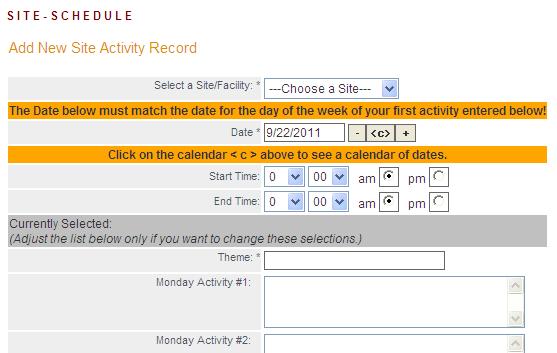
DS Weekly Schedule - by Caseload

The DS Weekly Schedule add form (under the Maintenance module) now only includes individuals in your caseload.

Incident Reports

Tennessee providers and ISC agencies can now run actual PDF copies of Incident Reports in a batch.  We added a new option to either view the list of incidents and investigations or view the reports on the same "View Incidents" search/filter screen that we have always had.  It also includes the option to search by incident date or date entered/submitted.

Monthly Encounter Report (Providers)

The Monthly Encounter Report is now available to users that have caseloads.  This is a very powerful report and should prove quite useful.  It is on the Maintenance, General Reports menu.

Antecedents, Behaviors and Consequences Totals Report

We have a new report showing the total counts of antecedents, behaviors and consequences per individual/service recipient.  This report is under the Notes, ABC Data:

Tuesday, September 6, 2011

Application for Employment

Contact us if you want to use the new Application for Employment feature.  It allows for potential employees to enter their employment applications on-line.  Then you can use the "Review" process under Employees, Applications, View Applications to view the applications or enter review information on a particular candidate.  Once approved, you can click on "Hire Applicant" to automatically load the person into the system as an employee.

Mock Fire Drill

We have added a new Mock Fire Drill "Report" link under Maintenance, Mock Fire Drill -- beneath the "View" and "Add..." links.  It allows you to print multiple reports within a date range instead of just one at a time.

Also, the wording "Employee Responsible" has been changed to "Staff Trained" and a correction was made to the calendar/date popups.

Medication Variance Report - TN

Tennessee has a new Medication Variance Report under Maintenance, General Reports called "Med Variance Report".  This report shows the same Medication Variance Report that you see under the Individuals section, while allowing you to search for multiple reports for multiple individuals between two dates.  You can select to search by the variance date or the date entered.

Friday, August 26, 2011

Direct Care Pro

Here's a screenshot from Direct Care Pro showing the individual selected having a daily note done for them.


Caseload Communications Tool -- Management Summary

ISC Agencies now have the "Management Summary" report in their Communications Tools module.  This report summarizes all of the individual reports by ISC and shows any areas needing attention.  Notes added from each report area are shown in that report's column, while an additional Management Note can be added that addresses the overall status of the individual for the month and year chosen. 

(Adding a Management Note (above))
(After Management Note is Added)
We also added the Incident date to the Additional Activity note that's automatically created when an ISC reviews a newly added incident.

Thursday, August 25, 2011

Optimizations

  • We've added a "View Last 24 Hours (Quick)" link to the individual's page.  It only brings back notes, medications given, and ABC Data.
  • We have improved the speed of our "View Last 24 Hours..." reports.  If you only need the information above, please use the "Quick" report. 
  • We are continuing with other Stability/Optimization efforts to improve system speed throughout the application.
  • Our Direct Care Pro off-line system is ready for use for adding Daily Notes, Nurse Notes, and CB notes -- even if the Internet is down.  When it detects that the Internet is available it adds any notes stored locally to the InfoServDD application automatically.
  • The Upload link now works for the Training link per employee in case you need to attach files to training taken.

Thursday, July 14, 2011

Enhancements

We are constantly improving InfoServDD on a daily basis.  Some things are behind the scenes "maintenance" development or bug fixes and are not very noticeable to you, while others are very noticeable.  We recently upgraded our development and server software to the latest version available.  This update has improved the performance of InfoServDD dramatically.

Caseload Communications Tool for Tennessee ISCs:  We have been refining the tool and concentrating on a version of the Combination Report which also allows the fixes to be made from one screen for various modules.  We also added a field to Demographics which can be used to exclude an individual from the Services/Appeals report on the Caseload Communications Tool.

Fire Drills/Weather Drills: Now asks whether or not a carbon monoxide detector is present and working (for most agencies).

Medications/Prescriptions:  Under the Prescriptions link, you can now enter whether or not the non-PRN med should be taken Daily, every other day, every three days, every week, every two weeks, etc.

HIPAA Logging: Improvements have been made to our facility that logs each and every action that a user takes.  Our logger records the date/time, information about the user and their agency, the specific action taken, and information about the individual/consumer/service recipient that they're working with, if applicable.

Secure Emails:  The Incident form in Virginia is now emailed using our new secure/encrypted email service.  This will be rolled out to all agencies requesting it as soon as possible.  (Note that My Messages is and always has been secure since it is on our secure site.)  If you are using our Secure Email solution and Gmail, you will by-pass having to provide a password since Gmail can handle the end-to-end security handoff.

Help Wiki:  The new Help Documentation Wiki is now available from the Help Documentation link on the Home page.  It is still under development, but could be useful to you in its current state.  By the way, help documentation will always be "under development" since we constantly add to and improve upon InfoServDD, which is the reason we chose to move towards this more efficient style.  The wiki allows you to type in any search phrase into the search box or you can follow the link for your state and drill down into the topic you want to review that way.

Incident Committee:  The Tennessee Incident Committee Report has been fixed.  The Report link under the Committee View (seen after you click on the Committee link of an incident when a Committee record already exists), is formatted as a PDF.  The Incident Committee information also is available on the Incident report.

Texas FC Note:  The Address on the FC Note has been corrected so that the address of the service recipient at the time of the note stays with the note.

My Clock-Ins/Outs:  Instead of just showing the current period, we now allow employees to perform searches by date range on their own time sheets.

Quarterly Summaries for Virginia:  Corrections were made on the Quarterly Summaries so that all applicable Outcomes/Goals were shown.

Service Authorization Attachments: There was an issue with the attachments for service plan authorizations.  This issue has been fixed

Automatic Error Reporting:  We now send every error to our support staff with an error number and all of the information necessary for us to properly diagnose and fix the issue.  You now see a "We are sorry..." message instead of the old error message.  This keeps you from having to copy/paste the error message and has helped us be more proactive at fixing issues. 

Casual Site Visits:  They used to default to the first site in the alphabetical list.  That seemed like a good idea, but some people forgot to change the site.  So we now default it to "blank" and force you to choose a site.

Nurse Workload Signatures:  Signatures were added to the Nurse Workload reports.

Vehicle Checklist:  This report now allows you to filter by the Unit number.

Automatic Logout:  When a user closes down the browser without logging out and then the browser is restarted and InfoServDD is selected, it automatically takes you to the login page.

Direct Care Pro:  We are continuing the development of our "off-line capable" software that handles entering notes and other actions even while your internet connection is down.  The first note will be entered through this system on July 18th and we are very excited about this product.

Wednesday, June 22, 2011

Mock Fire Drill Query

We've added a new query under Maintenance for Mock Fire Drills.  The "Q1", "Q2", etc. fields refer to the yes or no answers given for the questions on the form.

Color-coded Combined Notes

The Combined Notes report now displays different color for each message type to make it easier to differentiate between the notes.  Also, the outcome/goal progress note type now includes the outcome action description by the note type.

Tuesday, June 14, 2011

Tennessee Incident Form Change -- Investigator's Name Added

The short and long incident forms for Tennessee have been changed to include a field to enter the investigator contacted.  (The more detailed investigation form still exists.)

Monday, June 13, 2011

On the Roadmap: "Direct Care Pro"

Our project currently code-named "Direct Care Pro" is a separate piece of software for handling many of the daily tasks done by Direct Care Professionals.  It will be installed one time on your computer by clicking on a link from InfoServDD. 

Some sites in rural areas have trouble with their Internet service.  This new tool will constantly check the status of your Internet connection and will store the data locally and then synchronize the data with the on-line system when it becomes available.  So even if the Internet goes down, your notes, etc. will be saved!

Stay tuned for updates on this exciting new tool!

Sleep Chart Enhancements

The Sleep Chart report now has a total band at the bottom to calculate the amount of sleep between 8pm from the previous night to 8am of the next day for each day of the month.

Peek at the Upcoming Help Wiki

Here's a sneak peek at the new help/documentation wiki:
It will be available later this summer (2011).

Friday, June 10, 2011

Time Tracking Changes for Weekly and Bi-Weekly Periods

If you run our Time Tracking Payroll report and compute payroll based on a weekly or bi-weekly period, overtime is now calculated based on a simple 40 hour work week.

If you compute payroll based on a semi-monthly or monthly period, overtime is still calculated based on a Sunday through Saturday work week.  For example, this month -- June 2011 -- the first day of the month actually started on a Wednesday.  If you had worked on Sunday, May 29, Monday the 30th and Tuesday the 31st for 8 hours a day and also worked 8 hours a day Wednesday the 1st through Saturday, you would have 8 hours of overtime for the first "week" of June (because it takes into account the 29th - 31st).