Tuesday, April 12, 2011

Medication Administration "Tweaks"

We've been updating the Medication Administration module and have more to come.  The "Scheduled Time" for the med automatically populates, but only if the time you're entering the med is within an hour of the scheduled times you've added to the med/prescription.  Just keep in mind that you are matching the date and time given to the scheduled date/time so that it matches up correctly on the MAR Report.

Thursday, March 31, 2011

View Last 24 Hours Enhancement

The "View Last 24 Hours" report now includes the Medication Administration Report (MAR) at the very bottom for every state except Virginia.  (Virginia requires a Program designation to be entered prior to printing the report, so you must still run it from the MAR Report link there.)

Free Conference Calling


Clark Howard (the financial guru) recommends http://www.freeconferencecalling.com/ for your conference calling needs.  The service is completely free.  If you pay for long distance calls with your telephone plan, you'll still be paying that.  If you have unlimited long-distance, then it's all free.

Sunday, March 27, 2011

Caseload Activity Dashboard Enhancement

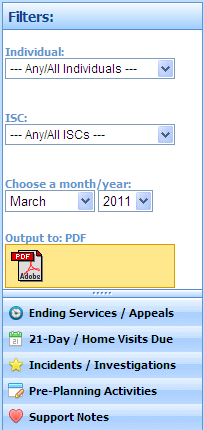
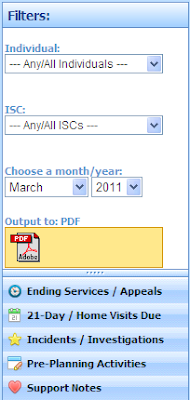
We've added an option to output the Caseload Activity reports to PDF (in addition to the screen).
Also, pre-planning records get created automatically as needed and populated with ISP effective dates and other associated dates.
Friday, March 25, 2011

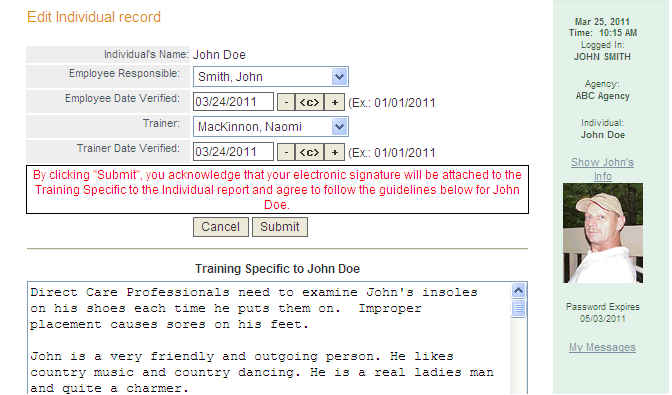
Training Specific to an Individual -- Authorization

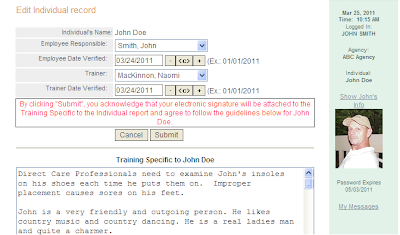
We now have a separate authorization process for the signatures to appear on the Training Specific to an Individual report.  From the Individuals/Service Recipients module, find the new menu "Training Spec. Auth." and add a new record so that an employee and trainer can authorize the training for that individual was completed.
Tuesday, March 22, 2011

InfoServDD System Availability

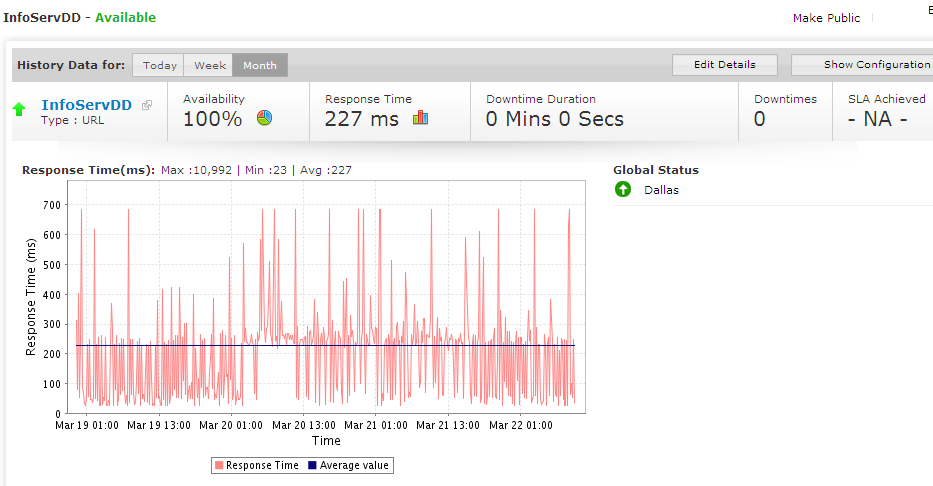
Ever wondered what our system availability is?  We switched to a new monitoring service recently and I hadn't received any alerts about it being down (ever).  It turns out, it just hasn't been down. How about 100% uptime?  We'll take that...

New Feature: Add Group Member to Groups in My Messages

We've added a new pull-down to add new group members to the public or private groups you have saved in My Messages.  Just click on the ---Add Group Member--- pull-down and select the new group member you want to add.... simple as that.

Wednesday, March 16, 2011

InfoServDD Home Page

InfoServDD is web-based software available for agencies supporting individuals with developmental disabilities and is available for customization for many different states.  We serve agencies in Tennessee, Texas, Oklahoma, Kentucky, Indiana, and Virginia.  We have been adding features to InfoServDD since the spring of 2000 and it has become an incredibly robust application for Independent Support Coordination agencies, therapy agencies, or agencies providing residential, day, or nursing care. 

Phone List

The Phone List report has been modified to include whether or not an employee has been "cleared to drive".  Home and cell phone numbers are also restricted to only non-management personnel.  The report is available in PDF format.

My Secure Messages

This feature allows our users to send emails internally using a secure connection.  There is no additional charge for this service.  Alerts generated by the system are also delivered via My Secure Messages.  Users can send messages to public or private groups and can add attachments and reply/reply all or forward.

Monday, March 7, 2011

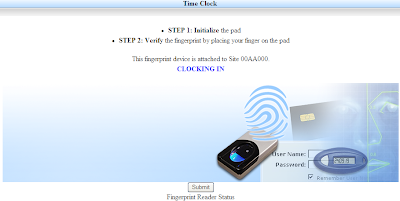
New support for Digital Persona (Windows 7) Biometric Fingerprint Scanners!

We now not only support Topaz fingerprint scanning devices, but also Digital Persona fingerprint scanners which work with Windows 7!   InfoServ DD utilizes biometric scanning technology to ensure that our users can quickly and easily login and clock-in to InfoServ DD.
Caseload Activity Dashboard for ISC Agencies

Thursday, January 27, 2011

Blank MAR

You now have the ability to print off a MAR report with the calendars and detailed information about the medications, but without the dates and times given.  Just choose the "Blank form" option on the MAR report.

Friday, January 21, 2011

New Blog

InfoServ DD has a new way to tell you about recently added features and planned features!


Here are some of our features for Individuals:


  • SELECT INDIVIDUAL
    •  Search by Name/SSN
  • PERSONAL INFO
    •  Edit Demographics
    •  Add Individual
    •  New Health Passport
    •  HealthCare Oversight
    •  HealthCare Report
    •  Enter Passport Info
    •  Personal Info Sheet
    • Checkbook
      •  View Entries
      •  Add Entry
      •  Checking Report
      •  Excel Report
      •  Entry Report
      •  Balances
      •  Summary
      •  Reconciliation
      •  Add Reconciliation
    • Personal Finances
      •  View
      •  Add
    • Petty Cash
      •  View
      •  Add
    • Property
      •  View Property
      •  Add Property
      •  Property Report
    • Legal Forms
      •  Select Form
    • Referrals
      •  View Referrals
      •  Add Referral
      •  Edit Referral
      •  Delete Referral
      •  Referral Report
    • Visitor Log
      •  View
      •  Add
      •  Report
  • Activity Calendar
    •  View
    •  Add
    •  Calendar
  • Menu Calendar
    •  View
    •  Add
    •  Clone
    •  Calendar
  •  Add Daily Notes
  • NOTES
    • Daily Notes
      •  Search
      •  Add Daily Notes
      •  Edit Template
      •  Reports
    • Daily Support Notes
      •  View Notes
      •  Add Note
      •  Edit Template
      •  Report
    • ABC Data
      •  View
      •  Add
      •  Report
    • BSP
      •  View
      •  Add
    • Nurse Notes
      •  View Notes
      •  Add Note
      •  Edit Template
      •  Report
    • Nurse Assessment
      •  View
      •  Add
    • Nurse Workload
      •  View Notes
      •  Add Nurse Workload
      •  Edit Template
      •  Report
    • Therapy Progress
      •  View Notes
      •  Add Note
      •  Report
    • Provider-Mo. Reviews
      •  View Reviews
      •  Search
      •  Add Review
      •  Automatic Review
      • Reports
        •  All
        •  Search
    • Assessments / BSP
      •  This Year
      •  Search
      •  Add Assessment or BSP
      • Reports
        •  All
        •  Searc
  • CONTACTS
    • Addresses
      •  View Addresses
      •  Add Address
      •  Address Report
    • Contacts
      •  View Contacts
      •  Link Contact
      •  Contact Report
      •  Contact Notes
    • Professionals
      •  View Prof.
      •  Link Prof.
      •  Prof. Report
    • Insurance
      •  View Policies
      •  Add Policy
      •  Ins. Policy Report
  • CHARTING
    •  Work With Charts
      •  Charting Report
    •  REQUIREMENTS
    • Attendance
      •  Search
      •  Add Attendance
      •  Report
    • BM
      •  Search
      •  Add BM
      •  BM Report
    • Hygiene
      •  Search
      •  Add Record
      •  Report
    • Seizure
      •  Search
      •  Add Seizure
      •  Seizure Report
    • Seizure Obs
      •  View
      •  Add
    • Weight
    • Menstrual
      •  View
      •  Add Menstrual
      •  Report
    • Day Services
      •  View
      •  Add
      •  Report
    • Fluid Intake
      •  Search
      •  Add
      •  Report
    • Fluid Output
      •  Search
      •  Add
      •  Report
    • Vitals
      •  View
      •  Add
      •  Report
    • Support. Employment
      •  View
      •  Add
      •  Report
    • Sleep
      •  View
      •  Add
      •  Report
    • Positioning
      •  Search
      •  Add
      •  Report
    • Range of Motion
      •  Search
      •  Add
      •  Report
    • Body Inspection
      •  Search
      •  Add
      •  Report
  • HEALTH
    • Diagnosis
      •  View Diagnoses
      •  Add Diagnosis
      •  Diag. Report
  • MED ADMIN
    • MAR
      •  Give Medication
      •  List Open MARs
      •  MAR Report
      •  Mo. MAR List
    • Med/Prescrip
      •  Add Med
      •  Edit Med
      •  Delete Med
      •  Prescriptions
      •  Medication Report
      •  Current Med Report
      •  Pharmacy Report
    • Med Count
      •  View
      •  Add
      •  Report
    • Med Variance
      •  View
      •  Add
  • OUTCOMES
    •  Current OUTCOMES
    •  All OUTCOMES
    •  Search Instructions
    •  ISP OUTCOMES Report
    •  Action Status Report
    •  View Staff Instruc.
    •  Staff Instruc. Report
    •  Add Progress Note
  • ISP
    •  View ISPs
    •  Add ISP
    •  Download Form
  • ENCOUNTERS / EVENTS
    •  View
    •  Add
    •  Report
    •  PCP/Specialist Chron.
  • SERVICE PLAN / Cost Plan
    •  Cost Plan
    •  Cost Plan Report
    •  SERVICE PLANs
    •  SERVICE PLAN Report
  • MOVED FROM / TO
    •  View Movement
    •  Add Movement
    •  Edit Movement
    •  Delete Movement
    •  Movement Report
  • PSR
    •  View PSR
    •  Add PSR
  • PLAN OF CARE
    •  View
    •  Add
  • INCIDENT / INVESTIG.
    •  View My County
    •  View Incidents
    •  Add Incident
    •  Add Incident Short
    • Reports
      •  By Description
      •  By Type
      •  By Severity
      •  By Location
      •  High Risk Review
      •  Investigation Info
      •  Committee Reviews
      •  Incident Query
      •  Committee Query
  • RISK ISSUE TOOL
    •  View Old Tools
    •  View New Tools
    •  Add Tool
...and some of our Financial Features:

  • MONTHLY BILLING
    •  Create monthly billing
    •  Unpaid billing records
    •  Closed billing cycles
    •  Enter actual amounts
    •  Close billing cycle
    •  Delete billing cycle
    • Reports
      • Billing
        •  Billing
        •  Cumulative
        •  Billing Calendar
        •  Billing Query
        •  Adjustments
      • Therapy
        •  Therapy Billing
        •  Util. Tracking
        •  Util. Tracking2
        •  Therapist UB92
        •  Billing Calendar
        •  Bill. Cal. Travel
      • Service/Cost Plans
        •  Service Plans
        •  SP Disposition
        •  Cost Plans
        •  CP Query
  • ADJUSTMENTS
    •  Add Adjustment
    •  Edit Adjustment
  • COA Export
    •  Add New COA
    •  Edit COA
    •  Delete COA
    •  COA Report
  • Batch Checking
    •  Search
    •  Add
...and some of our Employee/Contractor features:

  • Employee Mgmt
    •  Add Employee
    •  Display All
    •  Employee Search
  • Employee Training
    •  Employee Training
  • Admin Notes
    •  View Notes
    •  Add Note
    •  Delete Note
    •  Report
  • Exec Notes
    •  View Notes
    •  Add Note
    •  Delete Note
    •  Report
  • Applicants
    •  View Applicants
    •  Add Applicant
  • Applications
    •  View Applications
  • Job Postings
    •  View Jobs
    •  Add Job
  • Discipline
    •  View List
    •  Add
  • Misconduct
    •  View List
    •  Add
  • Evaluation
    •  View List
    •  Add
  • Training Schedule
    •  View Schedule
    •  Add Schedule
    •  Report
  • Shift Schedules
    •  View Shift Schedules
    •  Add Shift Schedule
    •  Shift Sched. Report
  • Work Schedules
    •  View Work Schedule
    •  Add Schedule
    •  Work Sched. Report
    •  Work Calendar
  • Workers Comp
    •  View Claims
    •  Add Claim
    •  Search Claims
  • Permissions Mgmt
    •  Edit User Groups
  • General Reports
    •  Applicants
    •  Auto Ins. Expirations
    •  Caseload
    •  Caseload Units
    •  Caseload CPRates
    •  Disciplary Action
    •  Drivers License Exp.
    •  Employees
    •  Employment
    •  Health Info
    •  INS Exp.
    •  Medication Certified
    •  New Employees
    •  Next Evaluation Due
    •  Personnel Checklist
    •  Terminations
    •  Time Tracking
    •  Training Record All
    •  Training Record
    •  Training ISC
    •  Training List
    •  Training Due All
    •  User Rights
    •  Workers Comp
    •  Work Sites
    •  Work Schedules
  • Queries
    •  Employees
    •  Employment
    •  Health
    •  Job Applicants
    •  Job Postings
    •  Leave
    •  Positions
    •  Training
    •  Login/Out
...and some of our Maintenance features:

  • Agency Mgmt
    •  View Agency
    •  Agency Sites
  • Casual Site Visit
    •  View Visits
    •  Add Visit
    •  Visit Report
  • Consumer Checklist
    •  View
    •  Add
    •  Report
  • Contacts Mgmt
    •  Add Contact
    •  Edit Contact
    •  Delete Contact
  • DS Weekly Schedule
    •  View
    •  Add
    •  Schedule
  • Fire/Weather Drills
    •  View Drills
    •  Add Drill Record
    •  Drill Report
  • Health Items Mgmt
    •  View All
    •  Search
    •  Add
  • Insurance Companies
    •  Add Company
    •  Edit Company
    •  Delete Company
  • Licenses
    •  View Licenses
    •  Add License
    •  License Report
  • Maintenance Request
    •  View
    •  Add
    •  Report
  • Medication Check
    •  View Med Checklists
    •  Add Med Checklist
    •  Med Checklist Report
  • Monthly Home
    •  View Weekly Home
    •  Add Weekly Home
  • Nightly Room Checks
    •  View Room Checks
    •  Add Room Check
    •  Room Check Report
  • Notifications Mgmt
    •  View
    •  Add
  • Omnicare Interface
    •  Upload File
  • Position Mgmt
    •  View All
    •  Search
    •  Add
  • Professionals Mgmt
    •  Add Prof.
    •  Edit Prof.
    •  Delete Prof.
  • Pull Down Mgmt
    •  View Groups
  • Res. site Visit
    •  View Site Visits
    •  Add Site Visit
    •  Site Visit Report
    •  Download Form
    •  Sites Listing
  • Site Calendar
    •  View
    •  Add
    •  Calendar
  • Site Menu Calendar
    •  View
    •  Add
    •  Calendar
  • Site Petty Cash
    •  View
    •  Add
    •  Report
  • Vehicle Check
    •  View Checklists
    •  Add Checklist
    •  Vehicle Report
  • Water Temp Chart
    •  View
    •  Add
    •  Report
  • Alt Agency Mgmt
    •  Setup Alt Agency
    •  Edit Alt Permissions
  • General Reports
    •  Assessment Report
      •  All
    •  Caseload Master
      •  All
    •  Caseload Outcomes
    •  Chart Reports
    •  Charting Composite
    •  Charting Report
      •  All
    •  Checking Entries
    •  Client Report
    •  Contacts Report
      •  Contacts Mailing Labels
    •  Daily Note Report
    •  Daily Note Tracking
    •  Daily Support Notes
    •  Daily Support Note Tracking
    •  Diagnosis Report
    •  Encounters Report
    •  Insurance Report
    •  Inventory Report
    •  ISP Contacts Report
    •  ISPs Current
    •  ISPs Due
    •  ISPs (All)
      •  All
    •  Med Management
    •  Meds/Prescriptions
    •  Prescriptions
    •  Medications Given
    •  Medication Alerts
    •  Medication Reorders
    •  Medication Variance
    •  Med Variance w/Name
    •  Med Var. Responsible
    •  Monthly Encounters
    •  Monthly Site Tracking
    •  Mo. Review Dates
    •  Monthly Review
      •  All
    •  Monthly Tracking
      •  All
    •  Movement Report
    •  Nursing Assessment
    •  Nurse Notes
    •  Nursing Workload
    •  Outcomes
    •  Outcome Actions
    •  Outcome Action Tracking
    •  Physical Dates
      •  All
    •  Professionals List
    •  Professionals/Clients
    •  Progress Notes
    •  Progress List
    •  Re-Certifications
      •  All
    •  Risk Issues Due
    •  Room Check Tracking
    •  Services Report
    •  Staff Insruc.
    •  Vehicle Inspect.
    •  Vital Signs
  • Utilization Reports
    •  Available Units
  • Therapist Reports
    •  Thera. Util.
    •  Util Tracking
    •  Available Units
    •  Therapy Evals
    •  Thera. Bill v. Non
    •  Client Services
  • Queries
    •  Individuals (Active)
    •  Individuals Oversight
    •  Addresses
    •  Agency Sites
    •  Casual Site Visit
    •  Contacts
    •  Daily Notes
    •  Daily Support Notes
    •  Diagnoses
    •  Encounters
    •  Finances
    •  Fire/Weather Drills
    •  Follow-Along Notes
    •  Health Charting
    •  Insurance
    •  Insurance Companies
    •  ISP Dates
    •  Licensure
    •  Medication Checklist
    •  Meds/Prescriptions
    •  Nightly Room Checks
    •  Omnicare Patient File
    •  Omnicare Order Record
    •  Outcome Actions
    •  Outcome Status
    •  Personal Property
    •  Professionals
    •  Residential Site Visit
    •  Staff Instructions Progress
  • Action Log
    •  Search Log
    •  Action Log Query
    •  Signature Demo